


AR Draw Anime: Sketch & Trace
4.328.00 Reviews
App Specs
- Version
- 1.3.8
- Updated On
- License
- Free
- Downloads
- 1,000,000+
- Developer
- BUGUN SOFTWARE COMPANY LIMITED
- Categories
- Art & Design
- Platform
- Android
Screenshots
 Analysis by AppCompare
I judge a drawing app not only by what it lets me make, but by how comfortably I can use it in the setting where I actually want to draw. AR Draw Anime: Sketch & Trace takes a hands-on route: instead of keeping the reference on a separate screen, it places an image over the view of a real surface. That can make copying a pose feel less abstract, especially when I’m still learning to notice where lines meet and how shapes fit together. It also means the experience depends on the surface, lighting, device position, and how steady I can keep my hands. Those practical details matter as much as the idea itself.
How the interface supports different readers
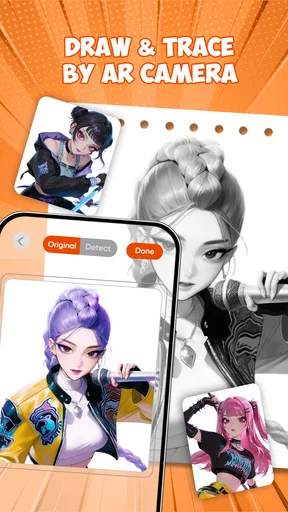
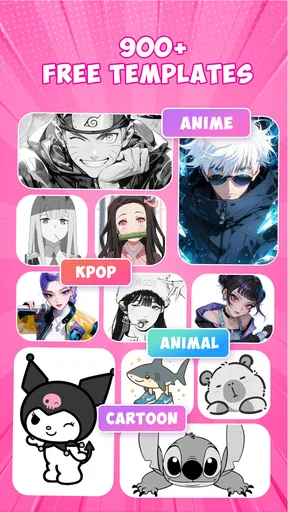
For an art-and-design app, its basic appeal is easy to understand: choose a template, position it, and use the projected guide as a drawing reference. The library offers more than 900 templates, so I can spend less time hunting for a starting point and more time deciding what to practice. BUGUN SOFTWARE COMPANY LIMITED makes an app aimed at people who want a guided way into sketching, rather than a blank digital canvas with a long list of tools to learn first.
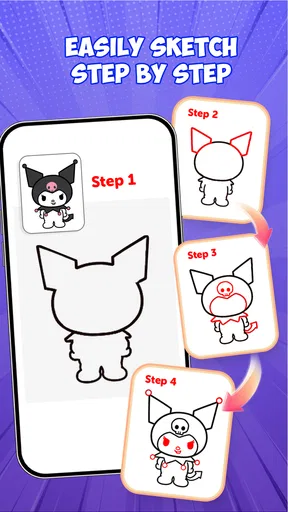
I would approach the interface in short stages rather than trying to master everything at once. First I’d choose a clear, uncomplicated sketch; then I’d settle the phone or tablet and adjust the guide before putting pencil to paper. This order matters: once I start drawing, even a small shift in the device can make the reference harder to follow. A simple image also helps me see whether I can distinguish the guide from my own lines before I move on to a more detailed character.
For someone who finds a blank page intimidating, the visible outline can provide a useful first step. It gives the eye a place to begin and makes a practice session feel more concrete than browsing drawing tips. I would not treat tracing as a substitute for learning to draw, though. The most useful habit is to study what the guide is showing—such as the direction of a contour or the relative size of shapes—then try the same kind of mark without relying on the overlay.
Hands, vision, and the physical setup
Adjustable transparency is especially helpful when the guide competes with the paper or the marks I have already made. I’d start with the image bold enough to follow, then fade it if the outlines make it difficult to see my own pencil strokes. This is a practical choice, not a universal setting: people with different vision, drawing materials, and room lighting may prefer different levels. Taking a moment to test the contrast on a small section can prevent frustration halfway through a sketch.
The physical arrangement is part of the drawing process. I need a surface where the paper can stay still and a device position that lets me see the guide without hunching uncomfortably. If holding the phone in place makes my drawing hand awkward, I’d pause and change the setup before continuing rather than trying to compensate with tense fingers. A short session with a stable reference is usually more useful than a long one spent repeatedly correcting the camera view.
That setup can be a drawback for anyone who needs both hands free, has limited reach, or finds fine tracing movements tiring. The app may offer a visual starting point, but it does not remove the physical demands of drawing on a real surface. I’d keep expectations realistic: it can make a reference easier to follow, but it cannot make every movement or posture comfortable for every person.
Worth Reading Before You Choose

EA SPORTS FC Mobile 26 Is a Bigger Football Game, but It Takes Time

Flipboard Shows What News Apps Must Do Beyond the Feed

Switching to Android Auto Means Rethinking Your Driving Routine

Google Calendar Makes a Crowded Week Easier to Manage

Ludo King Makes the Most of the Minutes Between Plans

Baby Panda World Brings Quick Play to Modern Phones, but Its Game Library Feels Busy
When AR helps—and when it gets in the way
AR gives this app a different feel from a conventional drawing tutorial or a gallery of reference pictures. With a normal reference image, I move my eyes between the screen and the page; with an overlay, the guide is brought into the same working area. That can help when I’m trying to place a line or compare proportions. On the other hand, a regular image may be easier if I want to zoom in, study details at my own pace, or keep my device out of the way while I draw.
Lighting is a real consideration for this kind of workflow. In a dim room, the camera-based view can become less dependable, so I’d choose a bright, evenly lit spot and avoid shadows falling across the page. That is a useful adjustment for a daytime practice session at a table, but less convenient when I want to sketch in bed or in a poorly lit corner. The surrounding space also matters: a flat, uncluttered surface makes it easier to position the paper and keep the projected guide usable.
For younger artists or anyone who is easily overwhelmed by a complex drawing program, the guided approach may feel more approachable than software built around layers, brushes, and editing panels. It is also suitable for a quick creative activity at home: I could pick a template, prepare paper, and trace one small section during a break rather than planning a full illustration. If the goal is finished digital artwork, precise editing, or a fully customizable canvas, a dedicated drawing app is likely the better fit.
Choosing a useful way to practise
I would use the templates as exercises rather than simply tracing an entire picture and moving on. One useful method is to focus on a single feature—perhaps the outline of the hair or the angle of a face—then look away from the guide and try to repeat that shape from memory. That small change turns copying into observation practice. Another is to begin with a simpler template and increase the detail only when I can keep the reference aligned and follow its main contours without constantly stopping.
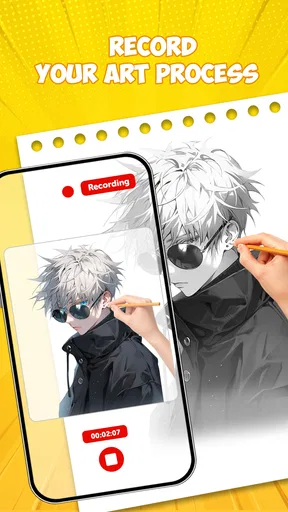
The recording option can be useful for reviewing how a drawing came together, not just for sharing it. Watching a replay may help me spot where I rushed, lost the outline, or changed the proportions. I’d treat it as a personal progress check rather than proof that each session must produce something polished. If recording distracts me from drawing, I would skip it and concentrate on one specific skill instead.
A realistic use case is an after-school or weekend sketch session at a kitchen table. I can clear a small area, choose a template, make sure the room is bright, and set the device so the guide stays visible while I work. If a family member wants to join, we can take turns using the same reference and compare how differently we interpret it. The app is less convenient on a crowded table or when I have to hold the device myself, so a little preparation makes a noticeable difference.
Access and comfort will vary from person to person, and I would not assume that a visual overlay suits every learning style. Someone who learns best by watching a demonstration may prefer a video lesson; someone who wants to understand construction may get more from a step-by-step drawing guide. A person with tremors or limited hand control may find tracing frustrating even when the outline is visible. In those situations, a larger, less detailed reference or a different kind of art activity may be kinder than pushing through a difficult setup.
Getting Started with AR Magic
First things first, let's talk about setting up AR Draw Anime: Sketch & Trace. The app is super intuitive—just download it, and you’re good to go. Once you fire it up, you'll notice its sleek and straightforward interface. You don’t need to be tech-savvy to navigate through its features. Trust me, if I can do it, anyone can!
The app uses Augmented Reality (AR) to project anime sketches onto real-life surfaces. All you need is your smartphone or tablet and a flat surface. Point your camera, and boom! Your chosen anime sketch appears right in front of you. It’s like having a personal art tutor, minus the intimidating vibe. You can adjust the size and position of the image to fit your preference, making it easy to trace and learn.
Features That Make You Go "Wow!"
One of the coolest features of this app is its extensive library of anime sketches. From classic characters to popular modern ones, there's something for everyone. Whether you’re into the edgy aesthetic of Attack on Titan or the whimsical charm of Studio Ghibli, you’ll find sketches that resonate with your style.
Another nifty feature is the adjustable transparency. You can make the image as faint or as bold as you like, which is super helpful for beginners learning to trace. And for those looking to challenge themselves, the app allows you to draw freehand after mastering the basics.
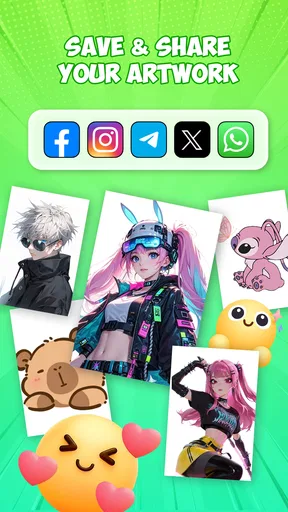
There's also a handy recording feature that lets you capture your drawing process. This is awesome for sharing your progress with friends or on social media. Plus, it’s a great way to track your improvement over time.
Why It’s a Game-Changer
What really sets this app apart is the AR technology. I mean, how often do you get to learn drawing through augmented reality? It’s not just fun; it’s downright innovative. The app bridges the gap between digital and traditional art, offering a unique learning experience that’s both engaging and effective.
For someone like me, who struggles with proportions and perspective, the app is a godsend. It's like having a guideline right in front of you, making it easier to understand complex shapes and lines. Plus, the ability to practice anywhere—whether on your dining table or an outdoor picnic—adds a layer of convenience that traditional methods can’t offer.
Room for Improvement
While the app is pretty fantastic, it’s not without its quirks. I noticed that the AR feature can be a bit finicky in low-light environments. So, if you’re working late at night, make sure you’ve got good lighting. Also, while the library is extensive, it would be cool to see user-generated content. Imagine being able to share your own sketches with the community!
Another point to consider is the subscription model. While there’s a free version, unlocking the full potential of the app requires a subscription. It's not a deal-breaker, especially for the value it provides, but it's something to keep in mind if you’re on a tight budget.
Final Thoughts
All in all, AR Draw Anime: Sketch & Trace is a game-changer for anyone looking to dive into the world of anime art. It’s a blend of technology and creativity that makes learning both fun and effective. Whether you’re a complete beginner or someone looking to refine their skills, this app has something to offer.
It is free to try, rated for Everyone, and has a 4.3 average from around 3.3 thousand ratings, with over 1 million installs. Its current version is 1.3.8, and it runs on Android 7.0 or later. Those details make it approachable for many Android users, but they do not change the main decision: this is a guided tracing tool, not a replacement for a full drawing studio or a structured art course. I’d choose it when I want a low-pressure way to practise anime outlines, and look elsewhere when I need more control over the finished artwork.
So, if you’re ready to unleash your inner artist and explore the magical world of anime, give this app a shot. Who knows? You might just surprise yourself with what you can create. Happy drawing!
Pros
- Easy to use interface for beginners.
- Wide range of anime templates available.
- Adjustable tracing opacity enhances control.
- Offline mode for drawing anywhere.
- Frequent updates with new templates.
Cons
- Limited customization options for advanced users.
- Ads can interrupt the drawing process.
- Requires precise camera alignment.
- Some templates lack detailed instructions.
- In-app purchases for premium content.
FAQs for AR Draw Anime: Sketch & Trace
What is AR Draw Anime: Sketch & Trace?
AR Draw Anime: Sketch & Trace is an innovative app that allows users to create anime sketches using augmented reality. By projecting guidelines onto paper through your device’s camera, it helps both beginners and experienced artists trace and enhance their drawing skills with ease.
How does the augmented reality feature work in the app?
The app uses your device’s camera to overlay anime sketch outlines onto a physical surface. You simply place your paper in the camera’s view, and the app projects the sketch guide, allowing you to trace directly onto the paper, offering a unique blend of digital and traditional art techniques.
Is the app suitable for beginners in drawing?
Yes, AR Draw Anime: Sketch & Trace is designed to cater to artists of all levels, including beginners. The app provides easy-to-follow guidelines and tutorials, helping new artists develop their skills and gain confidence in creating anime art with step-by-step assistance.
What are some key features of AR Draw Anime: Sketch & Trace?
Key features include a vast library of anime characters and scenes, adjustable AR guides for different skill levels, and the ability to customize and save your work. The app also offers tutorials and tips, making it an engaging and educational tool for anime enthusiasts.
Are there any in-app purchases or subscription fees?
While AR Draw Anime: Sketch & Trace offers a free version with basic features, there may be in-app purchases or subscription options available. These typically unlock additional content, such as premium anime guides or advanced tools, enhancing the overall user experience.


